시작하기
이 장은 응용 프로그램에 UI 계층을 붙이는 데 필요한 것을 설명합니다. 프로젝트를 구성하고, 세션을 만들어 초기화하고, 프로그램을 끝낼 때 정리하는 순서입니다. 지도 컨트롤을 올리는 방법은 2장에서 이어집니다.
화면 예시
화면은 glsGdkMap(Qt) 데모의 캡처입니다. 코드 예제는 Qt와 C# 탭에서 각각 확인할 수 있으며, 데모의 메뉴·배치는 최소 예제와 다를 수 있습니다.
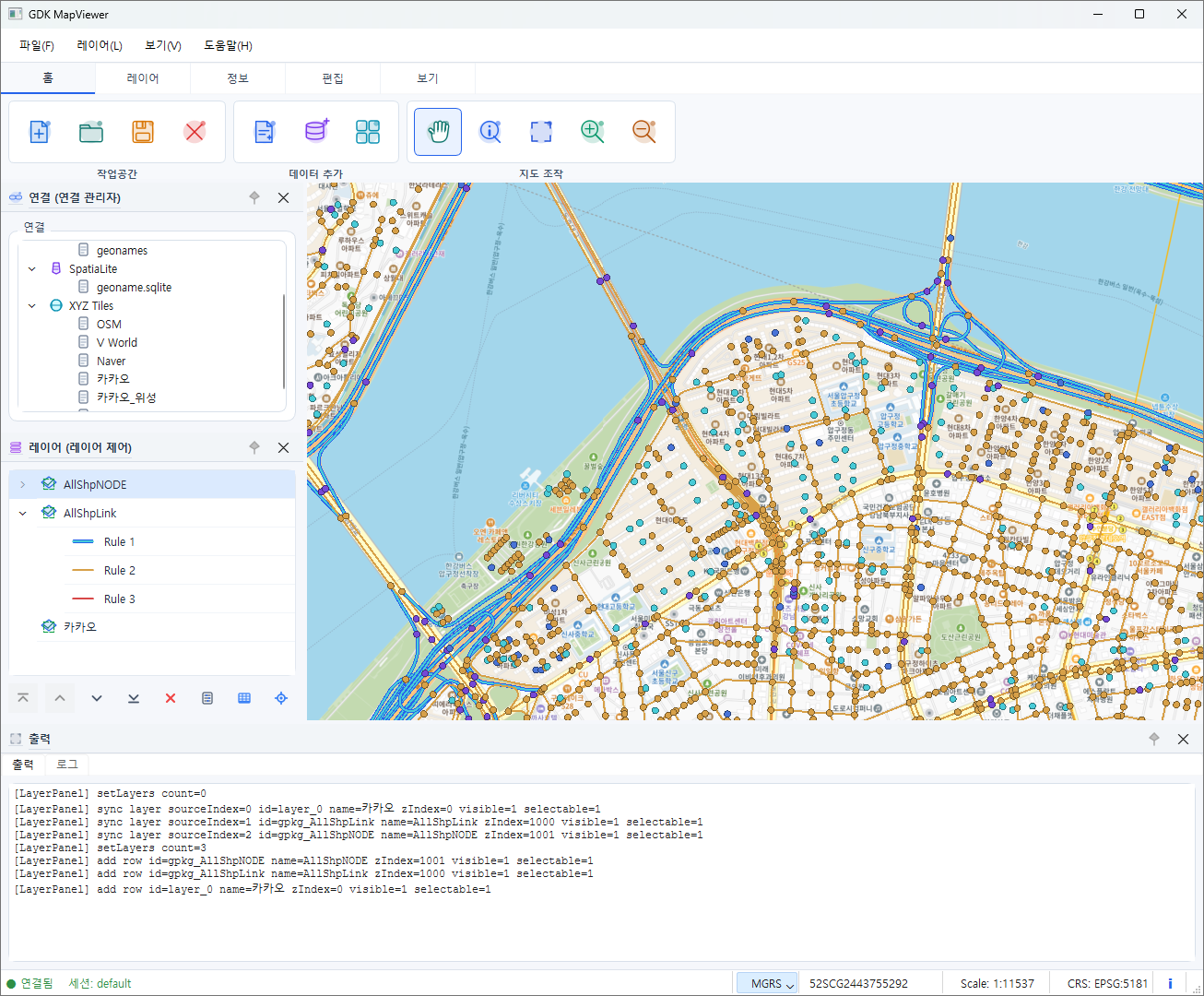
이 가이드의 코드는 빌드되는 예제에서 가져왔습니다. Qt는 apps/sdk_samples/qt_ui, C#은 apps/sdk_samples/cs_ui/MapHost입니다. 두 예제는 같은 창을 만듭니다. 지도 하나, 레이어 목록 하나, 지도 도구 버튼 몇 개가 있습니다.
계층
UI 계층은 엔진 계층 위에 있습니다.
| 계층 | 라이브러리 | 하는 일 |
|---|---|---|
| UI | glsGdkQt, CsGdk.WinForms | 창에 올리는 컨트롤, 컨트롤과 엔진을 잇는 컨트롤러 |
| 엔진 | glsGdk (C++), glsGdkCli (.NET) | 데이터, 지도 그리기, 선택, 편집, 지도 도구의 상태 기계 |
UI 계층은 엔진 객체를 숨기지 않습니다. 세션에서 엔진의 지도 뷰를 꺼내 엔진 API를 직접 부를 수 있고, 좌표 참조계, 레이어, 편집 상태의 규칙은 엔진 가이드를 그대로 따릅니다. 엔진 SDK를 프로젝트에 연결하는 방법과 실행 파일 옆에 두어야 하는 DLL도 엔진 가이드 1장에 있습니다.
프로젝트 구성
glsGdkQt는 소스로 씁니다. 라이브러리 폴더를 빌드에 더하고 qt_gdk_dll 타깃에 링크합니다. Qt6(Widgets)와 MSVC x64가 필요합니다.
# glsGdkQt is used from source: the library folder is added to the build and the
# application links the qt_gdk_dll target. GDK_SDK_ROOT is the engine SDK folder
# (include/gdk_dll, lib/<config>/glsGdk.lib, bin/<config>/glsGdk.dll).
set(GDK_SDK_ROOT "${CMAKE_CURRENT_LIST_DIR}/../../sdk" CACHE PATH "Root of the GDK SDK")
set(GDK_QT_LIBRARY_DIR "${CMAKE_CURRENT_LIST_DIR}/../../qt_gdk_dll" CACHE PATH "Folder of the glsGdkQt library sources")
include("${GDK_QT_LIBRARY_DIR}/../cmake/GdkSdkConfig.cmake")
if(WIN32)
    set(GDK_DLL_IMPORT_LIB "${GDK_SDK_ROOT}/lib/${GDK_SDK_CONFIG}/glsGdk.lib" CACHE FILEPATH "Path to glsGdk.lib")
    set(GDK_DLL_RUNTIME "${GDK_SDK_ROOT}/bin/${GDK_SDK_CONFIG}/glsGdk.dll" CACHE FILEPATH "Path to glsGdk.dll")
else()
    set(GDK_DLL_IMPORT_LIB "${GDK_SDK_ROOT}/lib/${GDK_SDK_CONFIG}/libglsGdk.so" CACHE FILEPATH "Path to libglsGdk.so")
endif()
if(NOT TARGET qt_gdk_dll)
    add_subdirectory("${GDK_QT_LIBRARY_DIR}" "${CMAKE_BINARY_DIR}/qt_gdk_dll")
endif()
include("${GDK_QT_LIBRARY_DIR}/cmake/QtGdkTargets.cmake")

# qt_gdk_add_app links qt_gdk_dll and glsGdk, and copies glsGdk.dll and the Qt runtime
# next to the executable.
qt_gdk_add_app(gdk_sample_map_host
    SOURCES
        src/main.cpp
        src/MapHostWindow.cpp
        src/MapHostWindow.h
)
헤더는 gdkqt/QtGdk.h 하나로 시작합니다. 세션과 지도 위젯이 여기에 들어 있습니다. 레이어 패널이나 선택 컨트롤러처럼 그 밖의 형식은 각자의 헤더를 포함합니다. 네임스페이스는 GdkQt입니다.
세션
세션은 UI 계층의 중심 객체입니다. 워크스페이스와 지도 뷰 하나를 가지고, 데이터를 열고 레이어를 다루는 함수를 제공합니다. 컨트롤과 컨트롤러는 세션을 빌려 씁니다. 그래서 세션을 가장 먼저 만들고 가장 나중에 없앱니다.
초기화는 공급자를 등록하고 워크스페이스를 만듭니다. 세션 하나에 한 번 부릅니다.
세션 클래스는 GdkQt::GdkQtSession으로 정의되어 있고 GdkQt::GdkSession이 그 별칭입니다. 새 코드는 GdkQt::GdkSession을 씁니다.
// The session owns the workspace and the map view. Everything else borrows it, so it is
// declared first and destroyed last.
std::unique_ptr<GdkQt::GdkSession> m_session;
// Widgets are owned by their parent widget.
GdkQt::GdkMapWidget* m_mapWidget = nullptr;
GdkQt::LayerPanel* m_layerPanel = nullptr;
GdkQt::AttributeTablePanel* m_attributeTablePanel = nullptr;
GdkQt::ConnectionPanel* m_connectionPanel = nullptr;
// Controllers are owned here and released in the destructor, in reverse order of creation.
std::unique_ptr<GdkQt::MapViewController> m_mapView;
std::unique_ptr<GdkQt::LayerPanelController> m_layerController;
std::unique_ptr<GdkQt::AppSettingsManager> m_settings;
std::unique_ptr<GdkQt::SelectionProvider> m_selectionProvider;
std::unique_ptr<GdkQt::SelectionController> m_selectionController;
std::unique_ptr<GdkQt::AttributeTableController> m_attributeTableController;
std::unique_ptr<GdkQt::EditWorkspaceController> m_editing;
std::unique_ptr<GdkQt::DynamicTilesController> m_dynamicTiles;
std::unique_ptr<GdkQt::DatasetIoController> m_datasetIo;
std::unique_ptr<GdkQt::ConnectionSettingsStore> m_connectionStore;
std::unique_ptr<GdkQt::ConnectionController> m_connectionController;
Qt 계층의 함수는 대부분 QString을 돌려줍니다. 빈 문자열이면 성공이고, 그렇지 않으면 사용자에게 보여 줄 수 있는 오류 문장입니다.
MapHostWindow::MapHostWindow(const QString& connectionsFile, QWidget* parent)
    : QMainWindow(parent),
      m_session(std::make_unique<GdkQt::GdkSession>())
{
    setWindowTitle(QStringLiteral("GDK map host"));
    resize(1200, 760);

    // attachSession gives the widget the session's map view to draw and to send input to.
    m_mapWidget = new GdkQt::GdkMapWidget(this);
    m_mapWidget->attachSession(m_session.get());
    setCentralWidget(m_mapWidget);

    // Functions of the Qt layer return an empty QString on success and a message to show on
    // failure. Initialize registers the providers and creates the workspace.
    const QString error = m_session->Initialize();
    if (!error.isEmpty()) {
        statusBar()->showMessage(error);
    }

    wireLayerPanel();
    wireSelection();
    wireAttributeTable();
    wireConnections(connectionsFile);
    createToolBar();
}
세션과 컨트롤의 함수는 UI 스레드에서 부릅니다. 데이터를 여는 함수는 끝날 때까지 돌아오지 않으므로, 오래 걸릴 수 있는 원격 데이터는 응용 프로그램이 진행 표시를 맡습니다.
종료 순서
끝낼 때는 만든 순서의 반대로 정리합니다.
- 컨트롤러를 없앱니다.
- 지도 컨트롤에서 세션을 뗍니다.
- 세션을 없앱니다.
- 프로세스 전체 정리 함수를 한 번 부릅니다.
MapHostWindow::~MapHostWindow()
{
    // Reverse order of creation: what borrows goes before what it borrows. Callbacks that
    // capture a controller are cleared first.
    m_mapWidget->setSelectionCallback({});
    m_connectionController.reset();
    m_connectionStore.reset();
    m_datasetIo.reset();
    m_dynamicTiles.reset();
    m_editing.reset();
    // The table panel borrows its controller, so the panel goes first.
    delete m_attributeTablePanel;
    m_attributeTablePanel = nullptr;
    m_attributeTableController.reset();
    m_selectionController.reset();
    m_selectionProvider.reset();
    m_settings.reset();
    m_layerController.reset();
    m_mapView.reset();
    m_mapWidget->attachSession(nullptr);
    // m_session is destroyed after this body, as the last member.
}
창과 세션이 모두 없어진 뒤에 GDK::glsGdkShutdown()을 부릅니다.
// Process-wide teardown, once: after the window and the session it owns are destroyed, and
// while glsGdk.dll is still loaded.
GDK::glsGdkShutdown();
4번은 세션이 아니라 프로세스의 일입니다. 세션을 여러 개 만들었다가 없애는 프로그램도 이 함수는 끝날 때 한 번만 부릅니다. 엔진 가이드 3장이 이유를 설명합니다.
다음 장
2장 지도 컨트롤 올리기에서 세션을 지도 컨트롤에 붙이고 데이터를 엽니다.