연결
이 장은 연결 트리를 붙이는 방법을 설명합니다. 연결 트리는 사용자가 등록한 데이터 원본(데이터베이스, 파일, 타일 서비스)을 보여 주고, 그 안의 테이블과 레이어를 지도에 더하게 합니다. 컨트롤은 Qt에서 GdkQt::ConnectionPanel, C#에서 CsGdk.WinForms.Controls.Connections.ConnectionControl입니다.
화면 예시
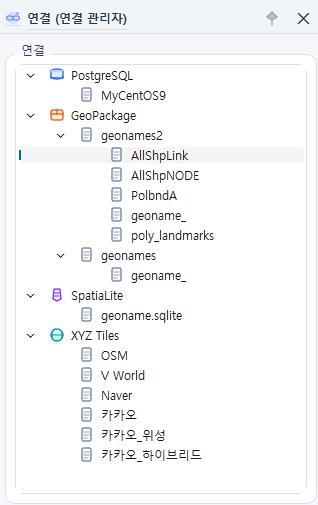
이 장에서 두 라이브러리의 차이가 가장 큽니다.
| Qt | C# | |
|---|---|---|
| 트리 컨트롤 | 요청만 내보내는 뷰 | 스스로 동작하는 컨트롤 |
| 요청을 실행하는 쪽 | ConnectionController (응용 프로그램이 만들어 연결) |
컨트롤 자신 |
| 필요한 것 | 세션, 지도 위젯, 레이어 컨트롤러, 지도 이동 컨트롤러, 데이터셋 컨트롤러, 속성 테이블 패널, 저장소, 상태 표시줄 | 연결 파일 경로, 세션 |
저장한 연결
등록한 연결은 파일에 저장됩니다. 파일의 위치는 응용 프로그램이 정합니다.
ConnectionSettingsStore가 패널의 연결을 파일에서 읽고 씁니다. 경로를 정하지 않으려면 ConnectionSettingsStore::settingsPath()를 씁니다(응용 프로그램 데이터 폴더의 connections.json).
읽기 전에 패널의 populateDefaultConnections()를 먼저 부릅니다. 이 함수가 트리를 비우고 종류별 뿌리 행을 만들고, 저장소의 load()는 그 아래에 연결을 덧붙입니다. load()를 두 번 부르면 같은 연결이 두 번 들어갑니다.
트리 붙이기
패널은 "연결해 달라", "레이어를 더해 달라", "SQL 콘솔을 열어 달라" 같은 요청 시그널만 냅니다. ConnectionController가 그 요청을 실행합니다. 컨트롤러는 창의 다른 부분을 빌려 씁니다. 레이어 목록을 갱신하려고 레이어 컨트롤러를, 레이어를 지도에 더하려고 데이터셋 컨트롤러를, 지도 레이어가 없는 테이블을 열려고 속성 테이블 패널을 씁니다.
void MapHostWindow::wireConnections(const QString& connectionsFile)
{
    m_connectionPanel = new GdkQt::ConnectionPanel(this);
    auto* dock = new QDockWidget(QStringLiteral("Connections"), this);
    dock->setWidget(m_connectionPanel);
    addDockWidget(Qt::LeftDockWidgetArea, dock);

    // The store reads and writes the saved connections of the panel.
    m_connectionPanel->populateDefaultConnections();
    m_connectionStore = std::make_unique<GdkQt::ConnectionSettingsStore>(
        m_connectionPanel,
        connectionsFile.isEmpty() ? GdkQt::ConnectionSettingsStore::settingsPath() : connectionsFile);
    m_connectionStore->load();

    // The panel only raises requests. ConnectionController carries them out, and for that it
    // borrows the other parts of the window: the layer controller to refresh the layer list,
    // the dataset controller to add layers to the map, the table panel to open tables that
    // have no map layer.
    m_dynamicTiles = std::make_unique<GdkQt::DynamicTilesController>(m_session.get(), m_mapWidget);
    m_datasetIo = std::make_unique<GdkQt::DatasetIoController>(
        m_session.get(), m_mapWidget, m_mapView.get(), m_dynamicTiles.get(), statusBar(), this);
    m_connectionController = std::make_unique<GdkQt::ConnectionController>(
        m_connectionPanel, m_session.get(), m_mapWidget, m_layerController.get(), m_mapView.get(),
        m_datasetIo.get(), m_attributeTablePanel, m_connectionStore.get(), statusBar(), this);
}
그래서 연결 트리는 3장의 레이어 컨트롤러와 6장의 속성 테이블 패널을 먼저 만든 뒤에 붙입니다. DatasetIoController는 DynamicTilesController를 받으므로 그것도 만듭니다. 모두 빌려 쓰는 것이어서 ConnectionController를 가장 먼저 없앱니다.
원격 원본
데이터베이스와 타일 서비스는 네트워크를 씁니다. 트리를 펼칠 때 목록을 읽는 일은 두 라이브러리 모두 배경에서 합니다. 레이어를 지도에 더하는 일은 끝날 때까지 돌아오지 않을 수 있습니다.
연결에 쓰는 URI의 표기와 자격 증명의 취급은 엔진 가이드 4장 데이터셋을 따릅니다.
다음 장
8장 지도 표시에서 축척 막대와 나침반을 켭니다.